xcall PCKLST, row, col, answer, array, maxcnt, prompt, exitcode {,strow, endrow, flags, file, mmoclr}
PCKLST displays a list of items in a box (aka a "pick list"), optionally waiting for the user to select one. Besides simplifying this common user interface element, it can operate in either text or GUI modes, making the decision at runtime based on external factors, and with a good deal of compatibility between them.
In GUI mode, PCKLST acts as an alias for a simple selection XTREE, while in text mode it acts as a wrapper for the vertical menu mode of INMEMO.
Developers committed to the GUI environment should consider PCKLST deprecated and just use XTREE directly, while those interested in both text and GUI (or text only) should use PCKLST. For information on the differences between PCKLST and XTREE, and how PCKLST/XTREE handles text versus GUI issues, see the note on those subjects in XTREE.

Comments
If XTF_XYXY not specified, the width of the box will be determined by considering the maximum length of the top and bottom prompts and the data items (not counting any hidden text). If XTF_XYXY is specified, then the coordinates of the box are explicitly determined by the row,col (upper left) and strow,endrow (interpreted as lower right row/col) parameters.
Rather than setting colors in individual calls to PCKLST, it would be easier to set them globally in the LIB:INI:CLR file. See Configuration for more details.
When the XTF_COLDFX flag is specified, the prompt parameter is assumed to be in the format of an XTREE advanced Coldef syntax definition with a single column. From this string, the ctitle field is extracted and used for the top title. (cpos is ignored and assumed to be 1; cwidth must be greater than or equal to the actual width of the elements of array; cformat is ignored.) The main advantage of using this alternate form is to make it easier for a program that operates in both text and GUI modes to take advantage of the features of XTREE without breaking PCKLST compatibility. PCKLST will ignore all of the Advanced Coldef Options that it doesn't understand, but there is one that it does: SelChgExit=###. For example:
prompt = "1~20~Selections~S~SelChgExit=155~~"
The above example would set the title to "Selections", and tell PCKLST to exit with exitcode -155 whenever the selection changes.
Inactive selection bar colors: Normally, when you exit from PCKLST, the bar indicating the selected item remains displayed, exactly as when the menu was active. This is typically desirable, or doesn't matter, but there are some situations where it is useful to provide some visual indication that the list (and selection process) are no longer active. XTREE handles this by changing the standard selection bar (dark blue) to light gray. PCKLST provides you an option to redisplay the selection bar in a different color scheme, by setting the RFCLR and RBCLR fields of the mmoclr structure to the desired colors. If left at the default values of -1, the selection bar is left as is.
See the sample program PCKMNU in EXLIB:[908,21] for an example of a two-level menu program using PCKLST which operates in either text or GUI mode.
PCKLST supports a maximum of 32K rows.
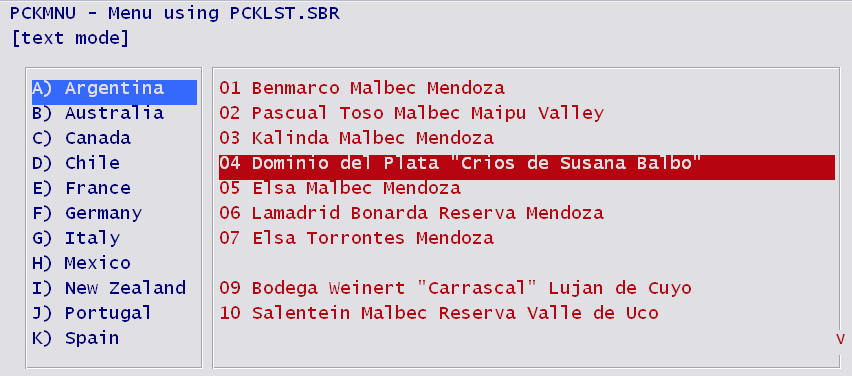
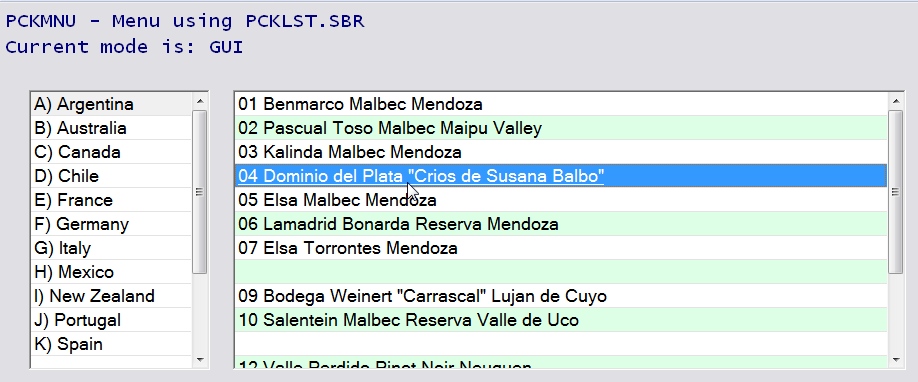
Background and Additional Notes
Originally, PCKLST was created to provide a simplified way of accessing INMEMO's menu mode with the idea of upgrading a functionally equivalent INFLD operation to be more user friendly. In other words, rather than call INFLD to have the user type one of the allowed options, the program could call PCKLST to perform the same function—input a field—but in a way that allows the user to easily see the choices and select one without actually typing it. For example:
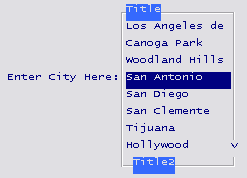
Screen save/restore was built in to PCKLST, so there was no need to worry about the parts of the screen that would be temporarily covered by the pick list (making it easier to upgrade a screen designed to allow only a single line for the input field).
With the advent of GUI capabilities in A-Shell, a more powerful Windows list/selection control (XTREE) was implemented, but with the same parameter interface. This allows A-Shell to redirect calls to PCKLST to the XTREE if the environment supports GUI and the feature is enabled in miame.ini (via SBR=PCKLST_GUI). Over time, XTREE grew to support so many extended capabilities unrelated to PCKLST that it is now difficult to recognize the parts of XTREE that are compatible with, or even related to PCKLST. So we've tried to keep it simple for PCKLST developers by keeping separate documentation, while trying to note the areas of particular similarity or difference between the two routines.