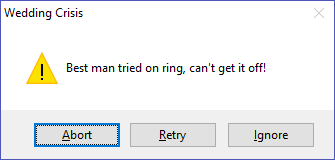
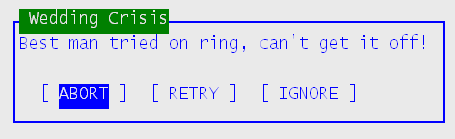
msg () [in]
Specifies the message to display. The width of the message box will be adjusted (within certain reasonable limits) to the size of the message, which will them be wrapped as needed. You can also force your own line breaks and blank lines by inserting CHR$(13) characters.
title () [in]
Specifies the title that will appear in the title bar of the message box.
btnflag () [in]
Select one of the following values to specify the set of response buttons that will appear in the message box. Note that you can change the button text via the btn1-btn5 parameters. When using custom buttons, you can set the btnflag to 0, which is equivalent to a single "OK" button in the standard case; if custom buttons are defined, will be interpreted accordingly. See Comments below for more details on defining custom buttons.
Symbol
|
Value
|
Description
|
MBTN_OK
|
0
|
OK button only, or customized buttons; see comments.
|
MBTN_OK_CANCEL
|
1
|
OK and CANCEL buttons
|
MBTN_ABORT_RETRY_IGNORE
|
2
|
ABORT, RETRY, and IGNORE buttons
|
MBTN_YES_NO_CANCEL
|
3
|
YES, NO, and CANCEL buttons
|
MBTN_YES_NO
|
4
|
YES and NO buttons
|
MBTN_RETRY_CANCEL
|
5
|
RETRY and CANCEL buttons
|
MBTN_CANCEL_TRY_CONTINUE
|
6
|
See note in History, below
|
|
|
|
MBTN_HELP
|
&h4000
|
Add a HELP button. Combine with any other MBTN_xxx option.
|
Definition File:
|
iconflag () [in]
Select one of the following to specify the standard Windows icon that appears in the message box (in a GUI environment). 0 specifies no icon. See iconspec to specify a custom icon.
Symbol
|
Value
|
Description
|
MBICON_STOP
|
&h0010
|
Stop (Red X)
|
MBICON_QUESTION
|
&h0020
|
Question (?)
|
MBICON_EXCLAMATION
|
&h0030
|
Exclamation (!)
|
MBICON_ICON
|
&h0040
|
Information (i)
|
Definition File:
|
miscflags () [in]
Combine zero or more of the following to specify misc options:
Symbol
|
Value
|
Description
|
MBMISC_DFLT2
|
&h0100
|
Make the second button be the default. (Normally the first button will be the default button.)
|
MBMISC_DFLT3
|
&h0200
|
Make the third button be the default.
|
MBMISC_DFLT4
|
&h0300
|
Make the fourth button be the default
|
MBMISC_DFLT5
|
&h0400
|
Make the fifth button be the default
|
MBMISC_SYSMODAL
|
&h1000
|
System modal. Suspends all Windows applications until the dialog box is responded to. (Windows only)
|
MBMISC_TASKMODAL
|
&h2000
|
Task modal. Suspends the A-Shell session until the dialog box is responded to. (Windows only)
|
MBMISC_TOPMOST
|
&h8000
|
Force message dialog to remain on top until closed. This prevents a problem where it can get hidden by other windows, even though it has the focus, making the other windows appear to be dead.
|
|
|
Definition File:
|
rtncde () [out]
Returns a code indicating what button was pushed to respond to the message, from the list below:
Symbol
|
Value
|
Description
|
MBRC_OK
|
1
|
OK button
|
MBRC_CANCEL
|
2
|
CANCEL button
|
MBRC_ABORT
|
3
|
ABORT button
|
MBRC_RETRY
|
4
|
RETRY button
|
MBRC_IGNORE
|
5
|
IGNORE button
|
MBRC_YES
|
6
|
YES button
|
MBRC_NO
|
7
|
NO button
|
MBRC_CLOSE
|
8
|
Dialog closed; see notes below
|
MBRC_HELP
|
9
|
HELP button
|
MBRC_TRYAGAIN
|
10
|
TRY AGAIN button
|
MBRC_CONTINUE
|
11
|
CONTINUE button
|
MBRC_CTRLC
|
12
|
Control-C; see notes below
|
<no symbol>
|
101
|
First custom button; see mxflags MBX_RCBTNO
|
|
102
|
Second " " " "
|
|
103
|
Third " " " "
|
|
104
|
Fourth " " " "
|
|
105
|
Fifth " " " "
|
Definition File:
|
A return code of 8 indicates that the message box was closed without clicking on one of the button choices (either the X button in the corner of the dialog under Windows/ATE or the Escape key under Unix/text mode). Note, however, that at least under Windows, the internal message box logic may try to translate the close option to one of the existing buttons if it makes logical sense. For example, closing an OK/CANCEL dialog may return as if CANCEL clicked.
The MBRC_xxx values are associated with standard buttons sets as specified by the MBTN_xxx values in btnflag while the values 101-105 are used for custom button sets; see mxflags MBX_RCBTNO flag and Comments below. Note that Control-C will set the Control-C flag (triggering ASB error 1) if Control-C is enabled; otherwise it will return MBRC_CTRLC. Also note that for the standard Windows Message Box, Control-C while the box is displayed may be ignored (acting instead as the Windows Copy command); but if the Control and C keys are down when the message box is created or destroyed, it will be detected and processed, providing a way out of situations where an error message box is being displayed in an endless loop. Hold down the Control and C buttons with one hand and dismiss the message box using the mouse with the other hand.
mxflags () [in]
flags related to extended options:
Symbol
|
Value
|
Description
|
MBX_RCBTNO
|
&h10000000
|
return 101-105 for buttons 1-5
|
MBX_FRCTXT
|
&h20000000
|
force plain text version
|
MBX_TI1
|
&h00100000
|
time-in delay on button 1
|
MBX_TI2
|
&h00200000
|
time-in delay on button 2
|
MBX_TI3
|
&h00400000
|
time-in delay on button 3
|
MBX_TI4
|
&h00800000
|
time-in delay on button 4
|
MBX_TI5
|
&h01000000
|
time-in delay on button 5
|
timeout () [in]
if not zero, sets the timeout (in seconds) on the default button, at which point the button is auto-clicked. Except in the case of icon buttons, the button will show the countdown progress.
timein () [in]
used in conjunction with the MBX_TIx flags (see mxflags) to specify a time (in seconds) before which one or more buttons are unable to be clicked (i.e. disabled). This is useful when you want to make sure the message box stays on the screen for at least a certain number of seconds, either so that the user can read the message, or perhaps to prevent the possibility of accidentally clicking a button before understanding the consequences. Note that if timeout is not zero, it overrides the timein for the default button.
url () [in]
optionally specifies a clickable hyperlink that appears beneath the message text and above the buttons. The visible text may be the same as the target url, or you may use HTML format to display something other than the actual link, e.g.
http://www.microsabio.com
<a href=http://www.microsabio.com>MicroSabio Home Page</a>
<a href="http://www.microsabio.com">MicroSabio Home Page</a>
The third example shows the proper HTML format—i.e., with the url field quoted. Note that to embed quotes within a quoted string in BASIC you have to use double quotes (""). The second example, without the extra quotes is supported for convenience.
See History note of May 2017.
iconspec () [in]
optionally specifies an icon (native Windows filespec or iconname::icondll, e.g. "warning::ashico1") to be used instead of the standard one based on the iconflag value, which will be ignored if iconspec is non-null. If neither an iconflag nor an iconspec is specified, the message box will have no icon. Note the standard icons specified via the iconflag parameter do not change size with fontscale, but custom icons (specified via iconspec) do scale.
btn1 - btn5 (, 32) [in]
optional text or icon to display for up to 5 buttons—assuming you want to override the default button text corresponding to the btnflag parameter. Although you can mix text buttons and icon buttons, it probably works (or looks) best if you stick to one or the other. For icons, you can use the native Windows filespec of the .ico file or the iconname::icondll format for an icon within an icon library (like ashico1.dll). Note the 32 byte limit on the length of each field; for ico filespecs, to fit within 32 characters you may need to drop the directory from the path and either put the icon in the current directory or in the default A-Shell icon search path—e.g. the cache, permcache, or icons subdirectories.
tip1 - tip5 () [in]
optional tool tips for up to 5 buttons.
fontface () [in]
optional font to use
fontscale () [in]
optional font scale adjustment in percent. 0 is treated the same as 100 percent. In modern high-res environments, you may find that increasing the font size makes for a more readable message. Note that the font scale does not affect the title bar, but it does affect nearly everything else in the message box. See note under iconspec.
fgc () [in]
optional RGB value to use for the message text.
bgc () [in]
optional RGB value to use for the background of the message.
|